Buổi 01: QA Kiểu Cũ vs AI-Native QA — Benchmark Sống Còn
Mục tiêu buổi học: Hiểu sự khác biệt giữa QA truyền thống và AI-Native QA, cài đặt CodyMaster, và tạo scaffold TaskFlow app để bắt đầu thực hành.
📚 Phần 1: Lý Thuyết (40 phút)
1.1 Vấn Đề Không Ai Nói
Có một sự thật không ai muốn nhắc đến trong ngành QA: khi AI xuất hiện, những QA engineer không thay đổi mindset sẽ bị loại đặc biệt nhanh chóng.
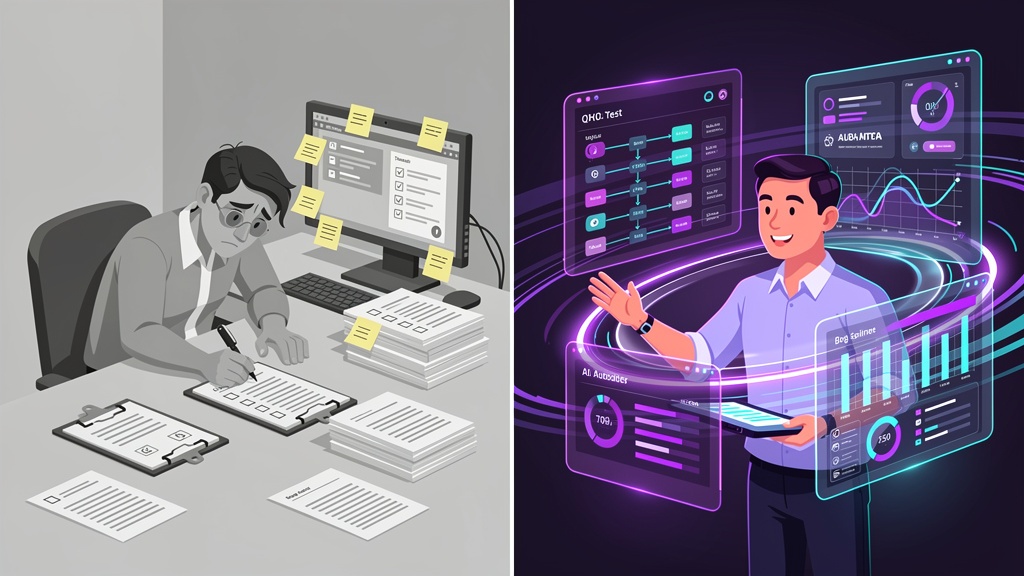
QA kiểu cũ dựa vào:
- Manual testing quy trình (click click click)
- Viết bug report lên Jira, rồi chờ dev fix
- Re-test lại sau khi dev nói "xong rồi"
- Deploy và cầu mong không có vấn đề gì xảy ra
- Tất cả là quy trình tuần tự — không parallelization, không automation gate
AI-Native QA là khác hoàn toàn:
- Test-first mentality (TDD — viết test trước, code sau)
- Tự động phát hiện edge case, không phụ thuộc vào intuition
- Multi-layer quality gate (tối thiểu 5 lớp)
- 8-gate deploy pipeline (code → test → lint → build → security → performance → integration → production)
- AI auto-generate issue, auto-heal failing tests, auto-suggest fix
1.2 So Sánh 12 Tiêu Chí: QA Cũ vs AI-Native
| Tiêu Chí | QA Kiểu Cũ | AI-Native QA |
|---|---|---|
| Flow | Sequential (tuần tự) | Parallel (song song) |
| Test | Manual, sau code | Automated, trước code (TDD) |
| Edge Case | Dựa vào kinh nghiệm | AI phát hiện hệ thống |
| Bug Report | Viết tay trên Jira | AI auto-generate + format |
| Fix Verification | Manual re-test | Auto-test gate xác nhận |
| Deploy | Cross fingers | 8-gate pipeline kiểm soát |
| Regression Risk | Cao (bỏ lỡ case) | Thấp (test toàn bộ) |
| Time to Market | 3-4 tuần | 3-4 ngày |
| Cost | Cao (QA team lớn) | Thấp (automation + AI) |
| Quality | 70-85% confident | 98%+ confident |
| Learning Curve | 6-12 tháng | 4-6 tuần (với mindset mở) |
| Bottleneck | QA resource availability | Prompt quality + discipline |
1.3 Iron Law của TDD
Đây là luật vàng, không có ngoại lệ:
"NO PRODUCTION CODE WITHOUT A FAILING TEST FIRST"
Nói cách khác:
- Viết unit test TRƯỚC (test sẽ FAIL vì code chưa tồn tại)
- Viết code VỪA ĐỦ để test PASS
- Refactor code (giữ test pass)
Tại sao?
Test-first forces edge case discovery — khi viết test, bạn bắt buộc phải nghĩ về:
- Null input?
- Empty string?
- Negative number?
- Concurrent requests?
- Database connection failure?
Test-after are biased by implementation — nếu viết code trước, test sẽ chỉ test những gì code already does, không test những gì nó NÊN làm.
Real Example: Function createTask(title, description)
❌ Test-After (QA cũ):
// Code viết trước
function createTask(title, description) {
  return { id: 1, title, description, created: new Date() };
}

// Test viết sau (bị ảnh hưởng bởi implementation)
test('createTask returns task object', () => {
  const task = createTask('Buy milk', 'Go to store');
  expect(task.title).toBe('Buy milk');
  // Không test: title = '', title = null, title = very long...
});
✅ Test-First (AI-Native):
// Test viết trước (FAIL)
test('rejects empty title', () => {
  expect(() => createTask('', 'description')).toThrow('Title is required');
});

test('rejects null title', () => {
  expect(() => createTask(null, 'description')).toThrow('Title is required');
});

test('rejects title > 255 chars', () => {
  const longTitle = 'a'.repeat(256);
  expect(() => createTask(longTitle, 'desc')).toThrow('Title too long');
});

test('creates task with valid input', () => {
  const task = createTask('Buy milk', 'Go to store');
  expect(task.id).toBeDefined();
  expect(task.created).toBeInstanceOf(Date);
});

// Code viết sau (vừa đủ để pass test)
function createTask(title, description) {
  if (!title || title.length === 0) throw new Error('Title is required');
  if (title.length > 255) throw new Error('Title too long');

  return {
    id: Math.random().toString(36).substr(2, 9),
    title,
    description,
    created: new Date()
  };
}
Nhìn thấy khác biệt không? Test-first phát hiện 3 edge case, test-after chỉ kiểm tra happy path.
1.4 Full Lifecycle Coverage
AI-Native QA không chỉ test code. Nó cover toàn bộ vòng đời:
Idea
  ↓
Plan (spec, acceptance criteria)
  ↓
Design (architecture, database schema)
  ↓
TEST FIRST (unit test, integration test, E2E test)
  ↓
Code (dev implements)
  ↓
Debug (error analysis, root cause)
  ↓
Quality Gate 1 (unit test pass)
  ↓
Quality Gate 2 (lint/format check)
  ↓
Quality Gate 3 (build check)
  ↓
Quality Gate 4 (security scan)
  ↓
Quality Gate 5 (performance benchmark)
  ↓
Integration Test
  ↓
Deploy to Staging
  ↓
Deploy to Production
  ↓
Monitor (logs, metrics)
  ↓
Document (auto-gen from code)
  ↓
Learn & Improve
Mỗi gate là một lần test tự động. Không có hand-off qua lại. Không ai ngồi chờ.
🛠️ Phần 2: Thực Hành (45 phút)
2.1 Bài Tập 1: Cài CodyMaster (10 phút)
CodyMaster là bộ toolkit giúp bạn tổ chức skills (prompts) và workflows.
Bước 1: Kiểm tra Node.js
node --version
npm --version
# Kỳ vọng: node v18+, npm v8+
Bước 2: Cài CodyMaster globally
npm install -g codymaster
# Hoặc nếu dùng homebrew
brew install codymaster
Bước 3: Kiểm tra cài đặt
cm --version
# Kỳ vọng output: codymaster v1.2.0 (hoặc version mới hơn)

cm status
# Output sẽ hiển thị:
# ✓ CodyMaster CLI installed
# ✓ Node version: v18.16.0
# ✓ npm version: 8.19.4
# ✓ Skills directory: /Users/yourname/.codymaster/skills
Lỗi Common:
command not found: cm→ reinstall hoặc add to PATHError: ENOENT ... skills→ create directory:mkdir -p ~/.codymaster/skills
2.2 Bài Tập 2: Tạo TaskFlow Scaffold (20 phút)
TaskFlow là mini app dùng để thực hành QA trong khóa học này. Nó bao gồm:
- Backend: Node.js + Express REST API
- Database: SQLite (lightweight, không cần setup)
- Testing: Vitest (modern, fast)
- Frontend: HTML/CSS/JavaScript đơn giản
Bước 1: Clone hoặc tạo project folder
# Nếu đã có taskflow-app folder trong qa-course
cd /Users/todyle/Documents/qa-course/taskflow-app

# Nếu chưa có, tạo mới
mkdir -p ~/projects/taskflow-qa && cd ~/projects/taskflow-qa
Bước 2: Cấu trúc thư mục
mkdir -p src/{routes,models,middleware}
mkdir -p public
mkdir -p test
mkdir -p data

# Tạo file chính
touch src/app.js
touch src/index.js
touch public/index.html
touch public/style.css
touch public/app.js
touch .gitignore
touch README.md
Bước 3: Khởi tạo npm project
npm init -y

# Sửa package.json để thêm:
# "type": "module",
# "scripts": { "start": "node src/index.js", "test": "vitest" }

npm install express better-sqlite3
npm install -D vitest @testing-library/dom jsdom
Bước 4: Tạo file src/app.js (Express app)
import express from 'express';
import path from 'path';
import { fileURLToPath } from 'url';
import Database from 'better-sqlite3';

const __filename = fileURLToPath(import.meta.url);
const __dirname = path.dirname(__filename);

const app = express();
app.use(express.json());
app.use(express.static(path.join(__dirname, '../public')));

// Initialize SQLite database
const db = new Database(path.join(__dirname, '../data/tasks.db'));

// Create tasks table if not exists
db.exec(`
  CREATE TABLE IF NOT EXISTS tasks (
    id TEXT PRIMARY KEY,
    title TEXT NOT NULL,
    description TEXT,
    status TEXT DEFAULT 'pending',
    created_at DATETIME DEFAULT CURRENT_TIMESTAMP,
    updated_at DATETIME DEFAULT CURRENT_TIMESTAMP
  )
`);

// Routes

// GET /api/tasks - Lấy tất cả tasks
app.get('/api/tasks', (req, res) => {
  try {
    const tasks = db.prepare('SELECT * FROM tasks ORDER BY created_at DESC').all();
    res.json({ success: true, tasks });
  } catch (error) {
    res.status(500).json({ success: false, error: error.message });
  }
});

// POST /api/tasks - Tạo task mới
app.post('/api/tasks', (req, res) => {
  const { title, description } = req.body;

  // Validation (đây là nơi test-first sẽ phát hiện edge case)
  if (!title || title.trim().length === 0) {
    return res.status(400).json({ success: false, error: 'Title is required' });
  }

  if (title.length > 255) {
    return res.status(400).json({ success: false, error: 'Title must be <= 255 chars' });
  }

  try {
    const id = Math.random().toString(36).substr(2, 9);
    const stmt = db.prepare(
      'INSERT INTO tasks (id, title, description) VALUES (?, ?, ?)'
    );
    stmt.run(id, title, description || '');

    const task = db.prepare('SELECT * FROM tasks WHERE id = ?').get(id);
    res.status(201).json({ success: true, task });
  } catch (error) {
    res.status(500).json({ success: false, error: error.message });
  }
});

// GET /api/tasks/:id - Lấy task cụ thể
app.get('/api/tasks/:id', (req, res) => {
  try {
    const task = db.prepare('SELECT * FROM tasks WHERE id = ?').get(req.params.id);
    if (!task) {
      return res.status(404).json({ success: false, error: 'Task not found' });
    }
    res.json({ success: true, task });
  } catch (error) {
    res.status(500).json({ success: false, error: error.message });
  }
});

// PUT /api/tasks/:id - Cập nhật task
app.put('/api/tasks/:id', (req, res) => {
  const { title, description, status } = req.body;

  try {
    const task = db.prepare('SELECT * FROM tasks WHERE id = ?').get(req.params.id);
    if (!task) {
      return res.status(404).json({ success: false, error: 'Task not found' });
    }

    const updateStmt = db.prepare(
      'UPDATE tasks SET title = ?, description = ?, status = ?, updated_at = CURRENT_TIMESTAMP WHERE id = ?'
    );
    updateStmt.run(title || task.title, description || task.description, status || task.status, req.params.id);

    const updated = db.prepare('SELECT * FROM tasks WHERE id = ?').get(req.params.id);
    res.json({ success: true, task: updated });
  } catch (error) {
    res.status(500).json({ success: false, error: error.message });
  }
});

// DELETE /api/tasks/:id - Xóa task
app.delete('/api/tasks/:id', (req, res) => {
  try {
    const task = db.prepare('SELECT * FROM tasks WHERE id = ?').get(req.params.id);
    if (!task) {
      return res.status(404).json({ success: false, error: 'Task not found' });
    }

    db.prepare('DELETE FROM tasks WHERE id = ?').run(req.params.id);
    res.json({ success: true, message: 'Task deleted' });
  } catch (error) {
    res.status(500).json({ success: false, error: error.message });
  }
});

export default app;
Bước 5: Tạo file src/index.js (Server entry point)
import app from './app.js';

const PORT = process.env.PORT || 3000;

app.listen(PORT, () => {
  console.log(`✓ TaskFlow server running at http://localhost:${PORT}`);
  console.log(`✓ API base: http://localhost:${PORT}/api`);
});
Bước 6: Tạo public/index.html (Frontend cơ bản)
<!DOCTYPE html>
<html lang="vi">
<head>
  <meta charset="UTF-8">
  <meta name="viewport" content="width=device-width, initial-scale=1.0">
  <title>TaskFlow - QA Practice App</title>
  <link rel="stylesheet" href="style.css">
</head>
<body>
  <div class="container">
    <h1>TaskFlow 📋</h1>
    <p class="subtitle">QA Practice Application</p>

    <div class="form-section">
      <h2>Tạo Task Mới</h2>
      <form id="taskForm">
        <input type="text" id="title" placeholder="Tiêu đề task..." required>
        <textarea id="description" placeholder="Mô tả chi tiết..."></textarea>
        <button type="submit">Tạo Task</button>
      </form>
    </div>

    <div class="tasks-section">
      <h2>Danh Sách Tasks</h2>
      <div id="tasksList" class="tasks-list">
        <p class="loading">Đang tải...</p>
      </div>
    </div>
  </div>

  <script src="app.js"></script>
</body>
</html>
Bước 7: Tạo public/style.css
* {
  margin: 0;
  padding: 0;
  box-sizing: border-box;
}

body {
  font-family: -apple-system, BlinkMacSystemFont, 'Segoe UI', Roboto, sans-serif;
  background: linear-gradient(135deg, #667eea 0%, #764ba2 100%);
  min-height: 100vh;
  padding: 20px;
}

.container {
  max-width: 800px;
  margin: 0 auto;
  background: white;
  border-radius: 12px;
  padding: 30px;
  box-shadow: 0 20px 60px rgba(0, 0, 0, 0.3);
}

h1 {
  color: #333;
  margin-bottom: 8px;
}

.subtitle {
  color: #999;
  margin-bottom: 30px;
  font-size: 14px;
}

h2 {
  font-size: 18px;
  color: #333;
  margin-bottom: 15px;
  margin-top: 25px;
}

.form-section {
  margin-bottom: 40px;
}

#taskForm {
  display: flex;
  flex-direction: column;
  gap: 12px;
}

input[type="text"],
textarea {
  padding: 12px;
  border: 1px solid #ddd;
  border-radius: 6px;
  font-family: inherit;
  font-size: 14px;
}

input[type="text"]:focus,
textarea:focus {
  outline: none;
  border-color: #667eea;
  box-shadow: 0 0 0 3px rgba(102, 126, 234, 0.1);
}

textarea {
  resize: vertical;
  min-height: 80px;
}

button {
  padding: 12px 24px;
  background: #667eea;
  color: white;
  border: none;
  border-radius: 6px;
  cursor: pointer;
  font-weight: 600;
  transition: background 0.2s;
}

button:hover {
  background: #5568d3;
}

.tasks-list {
  display: flex;
  flex-direction: column;
  gap: 12px;
}

.task-item {
  padding: 16px;
  background: #f8f9fa;
  border-radius: 8px;
  border-left: 4px solid #667eea;
}

.task-title {
  font-weight: 600;
  color: #333;
  margin-bottom: 6px;
}

.task-desc {
  color: #666;
  font-size: 14px;
  margin-bottom: 8px;
}

.task-meta {
  display: flex;
  justify-content: space-between;
  align-items: center;
  font-size: 12px;
  color: #999;
}

.task-status {
  padding: 4px 12px;
  background: #e8f4f8;
  color: #0c7792;
  border-radius: 4px;
  font-weight: 600;
}

.task-actions {
  display: flex;
  gap: 8px;
  margin-top: 10px;
}

.task-actions button {
  flex: 1;
  padding: 8px 12px;
  font-size: 12px;
  background: #667eea;
  transition: all 0.2s;
}

.task-actions button:hover {
  background: #5568d3;
}

.task-actions .delete-btn {
  background: #e74c3c;
}

.task-actions .delete-btn:hover {
  background: #c0392b;
}

.loading {
  text-align: center;
  color: #999;
  padding: 20px;
}

.error {
  background: #fff3cd;
  color: #856404;
  padding: 12px;
  border-radius: 6px;
  margin-bottom: 12px;
}

.success {
  background: #d4edda;
  color: #155724;
  padding: 12px;
  border-radius: 6px;
  margin-bottom: 12px;
}
Bước 8: Tạo public/app.js (Frontend logic)
const API_BASE = '/api';
// Load tasks khi page tải
document.addEventListener('DOMContentLoaded', loadTasks);
// Form submit handler
document.getElementById('taskForm').addEventListener('submit', async (e) => {
e.preventDefault();
const title = document.getElementById('title').value.trim();
const description = document.getElementById('description').value.trim();
if (!title) {
alert('Vui lòng nhập tiêu đề task');
return;
}
try {
const response = await fetch(`${API_BASE}/tasks`, {
method: 'POST',
headers: { 'Content-Type': 'application/json' },
body: JSON.stringify({ title, description })
});
const data = await response.json();
if (!data.success) {
alert('Lỗi: ' + data.error);
return;
}
document.getElementById('title').value = '';
document.getElementById('description').value = '';
loadTasks();
} catch (error) {
alert('Lỗi kết nối: ' + error.message);
}
});
// Load tasks từ API
async function loadTasks() {
try {
const response = await fetch(`${API_BASE}/tasks`);
const data = await response.json();
const tasksList = document.getElementById('tasksList');
if (!data.tasks || data.tasks.length === 0) {
tasksList.innerHTML = '<p class="loading">Chưa có task nào. Hãy tạo task đầu tiên!</p>';
return;
}
tasksList.innerHTML = data.tasks.map(task => `
<div class="task-item">
<div class="task-title">${escapeHtml(task.title)}</div>
${task.description ? `<div class="task-desc">${escapeHtml(task.description)}</div>` : ''}
<div class="task-meta">
<span>${new Date(task.created_at).toLocaleString('vi-VN')}</span>
<span class="task-status">${task.status === 'pending' ? 'Chờ xử lý' : 'Hoàn thành'}</span>
</div>
<div class="task-actions">
<button onclick="markComplete('${task.id}')" style="${task.status === 'completed' ? 'display:none' : ''}">
✓ Hoàn thành
</button>
<button class="delete-btn" onclick="deleteTask('${task.id}')">
🗑 Xóa
</button>
</div>
</div>
`).join('');
} catch (error) {
document.getElementById('tasksList').innerHTML = `<p class="error">Lỗi tải tasks: ${error.message}</p>`;
}
}
async function markComplete(id) {
try {
await fetch(`${API_BASE}/tasks/${id}`, {
method: 'PUT',
headers: { 'Content-Type': 'application/json' },
body: JSON.stringify({ status: 'completed' })
});
loadTasks();
} catch (error) {
alert('Lỗi cập nhật: ' + error.message);
}
}
async function deleteTask(id) {
if (!confirm('Xác nhận xóa task này?')) return;
try {
const response = await fetch(`${API_BASE}/tasks/${id}`, { method: 'DELETE' });
const data = await response.json();
if (!data.success) {
alert('Lỗi: ' + data.error);
return;
}
loadTasks();
} catch (error) {
alert('Lỗi xóa: ' + error.message);
}
}
function escapeHtml(unsafe) {
return unsafe
.replace(/&/g, "&")
.replace(/</g, "<")
.replace(/>/g, ">")
.replace(/"/g, """)
.replace(/'/g, "'");
}2.3 Bài Tập 3: Chạy TaskFlow Lần Đầu (15 phút)
Bước 1: Khởi động server
cd ~/projects/taskflow-qa  # hoặc thư mục project của bạn
npm start

# Output kỳ vọng:
# ✓ TaskFlow server running at http://localhost:3000
# ✓ API base: http://localhost:3000/api
Bước 2: Mở browser
http://localhost:3000Bạn sẽ thấy:
- Trang TaskFlow với form "Tạo Task Mới"
- Danh sách task (hiện tại trống)
Bước 3: Tạo task đầu tiên
- Điền Title: "Learn QA AI-Native"
- Điền Description: "Understand TDD principle"
- Nhấn "Tạo Task"
Output kỳ vọng:
✓ Task được tạo thành công
✓ Xuất hiện trong danh sách
✓ Timestamp hiển thị đúng
✓ Button "Hoàn thành" và "Xóa" có thể nhấn
Bước 4: Test API trực tiếp với curl
# GET all tasks
curl -X GET http://localhost:3000/api/tasks

# Output:
# {
#   "success": true,
#   "tasks": [
#     {
#       "id": "abc123def",
#       "title": "Learn QA AI-Native",
#       "description": "Understand TDD principle",
#       "status": "pending",
#       "created_at": "2026-04-24 14:30:00",
#       "updated_at": "2026-04-24 14:30:00"
#     }
#   ]
# }

# POST new task
curl -X POST http://localhost:3000/api/tasks \
  -H "Content-Type: application/json" \
  -d '{"title":"Buy groceries","description":"Milk, eggs, bread"}'

# Output:
# {
#   "success": true,
#   "task": {
#     "id": "xyz789abc",
#     "title": "Buy groceries",
#     ...
#   }
# }

# Test edge case: empty title
curl -X POST http://localhost:3000/api/tasks \
  -H "Content-Type: application/json" \
  -d '{"title":"","description":"Empty title"}'

# Output:
# {
#   "success": false,
#   "error": "Title is required"
# }
Bước 5: Dừng server
# Nhấn Ctrl+C trong terminal📝 Phần 3: Bài Tập Về Nhà
Task 1: Đọc và Tóm Tắt (15 phút)
Đọc file README.md từ CodyMaster repository (tìm trên GitHub). Viết tóm tắt 5 điểm chính về cách CodyMaster giúp QA engineer.
Gợi ý: Tập trung vào phần "Why CodyMaster?" hoặc "Philosophy"
Task 2: Liệt Kê Điểm Khác Biệt (10 phút)
Liệt kê 5 điểm khác biệt LỚN NHẤT giữa QA Cũ vs AI-Native QA. Với mỗi điểm, giải thích tại sao nó quan trọng.
Format:
1. [Điểm khác biệt]
   - QA Cũ: ...
   - AI-Native: ...
   - Tại sao quan trọng: ...

2. [Tiếp theo]
   ...
Task 3: Thực Hành Tạo Tasks (20 phút)
Khởi động TaskFlow server (npm start) và tạo 3 tasks:
Task 1: "Write unit test for createTask()"
- Description: "Test edge cases: empty title, null, long title"
Task 2: "Implement createTask() function"
- Description: "Function must validate title and reject empty/null"
Task 3: "Run test suite and verify all tests pass"
- Description: "Use npm test"
Chứng minh: Chụp screenshot của TaskFlow hiển thị 3 tasks này.
✅ Phần 4: Kiểm Tra Kiến Thức
Quiz (20 phút)
Trả lời 5 câu hỏi multiple choice dưới đây. Chọn đúng 1 đáp án cho mỗi câu.
Câu 1: TDD Iron Law nói gì?
- A) Viết code, rồi viết test
- B) Viết test, rồi viết code (test FAIL trước)
- C) Viết code và test cùng lúc
- D) Test không quan trọng, code là chính
- Đáp án đúng: B
Câu 2: So với QA Cũ, AI-Native QA có lợi thế gì?
- A) Cần ít QA engineer hơn
- B) Tự động phát hiện edge case
- C) Nhanh hơn từ 10-20x
- D) Tất cả các lựa chọn trên
- Đáp án đúng: D
Câu 3: Multi-layer quality gate là gì?
- A) Test tất cả code cùng lúc
- B) Từng lớp kiểm tra khác nhau (unit test → lint → build → security → ...)
- C) Dùng một tool kiểm tra toàn bộ
- D) QA kiểu cũ gọi là "gate"
- Đáp án đúng: B
Câu 4: TaskFlow app dùng cơ sở dữ liệu nào?
- A) PostgreSQL
- B) MongoDB
- C) SQLite
- D) MySQL
- Đáp án đúng: C
Câu 5: Khi test-first, test thường FAIL trước vì sao?
- A) Code chưa tồn tại
- B) Database chưa cài
- C) Server chưa chạy
- D) Node.js bị lỗi
- Đáp án đúng: A
Tiêu Chí Đánh Giá
| Tiêu Chí | Điểm |
|---|---|
| Quiz: 5/5 đúng | 2 điểm |
| Bài tập về nhà hoàn thành | 2 điểm |
| TaskFlow chạy thành công + 3 tasks | 2 điểm |
| Hiểu rõ TDD Iron Law | 2 điểm |
| Tham gia thảo luận lớp | 2 điểm |
| Tổng cộng | 10 điểm |
🔗 Liên Kết & Tài Liệu
- Buổi trước: 00-introduction
- Buổi tiếp theo: 02-prompting-for-qa
- CodyMaster GitHub: https://github.com/codymaster/codymaster
- TaskFlow App: taskflow-app folder
- Vitest Documentation: https://vitest.dev
💡 Ghi Chú Cho Giáo Viên
- Timing: Nếu lớp chậm, có thể bỏ phần curl testing (2.4)
- Internet Issue: CodyMaster có thể install offline. Download npm packages trước
- Database Lỗi: Nếu SQLite lỗi, delete
data/tasks.dbvà chạy lại - Port 3000 bị dùng: Thay bằng
PORT=3001 npm start